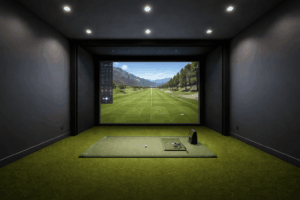
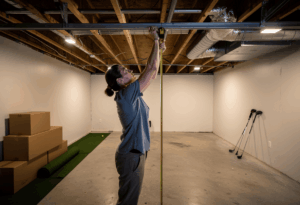
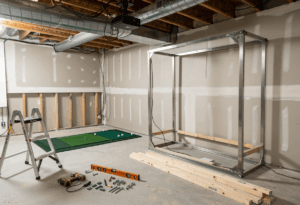
Yes, you can build a functional golf simulator in a small room – but the word “functional” does real work in that sentence. The absolute minimum for a working sim with any club is roughly 10 feet wide, 12 feet deep, and 9 feet high. That’s tight. You’ll be offset hitting, restricted to camera-based launch monitors, and likely skipping the projector in favor of a TV or tablet. But it works, and thousands of golfers are doing exactly this in spare bedrooms, bonus rooms, and single-car garages.
The trick isn’t squeezing standard equipment into a small space. It’s choosing components designed for tight footprints and being honest about which clubs you can actually swing. I’ve fitted sims in rooms that most builders would walk away from, and the builds that succeed are the ones where the owner understood what they were getting and what they were giving up before the first purchase shipped.
The honest answer: A full driver sim needs minimum 10W x 15D x 9H feet. A compact iron-and-wedge sim works in as little as 10W x 12D x 8.5H feet. Net-and-launch-monitor setups (no projector) work in even tighter spaces. Camera-based launch monitors are mandatory in small rooms – radar units require too much depth.
What “small room” actually means for a golf simulator
The comfortable standard for a home simulator is 14 feet wide, 18 feet deep, and 10 feet high. Anything significantly below those numbers qualifies as a small-room build, and each dimension you lose creates specific trade-offs.
Low ceilings (under 9 feet) are the hardest constraint because they limit which clubs you can swing. At 8.5 feet, most golfers are restricted to mid-irons and wedges. At 8 feet, it’s short irons and wedges only. There’s no equipment workaround for a ceiling that’s too low – either your swing clears it or it doesn’t.
Narrow rooms (under 12 feet) force offset hitting positions. You can’t center the ball in a 10-foot-wide room and have adequate side clearance for a full follow-through. Offset hitting works fine for a single right-handed or left-handed golfer, but it rules out comfortable mixed-handed play and limits enclosure sizing.
Shallow rooms (under 15 feet) eliminate radar launch monitors entirely and force careful projector selection. Camera-based units like the SkyTrak+ and Bushnell Launch Pro work in as little as 12-15 feet of total depth. Radar units need 18-20 feet minimum and simply won’t function in a compact room.
The minimum dimensions that actually work
Full bag (including driver): 10W x 15D x 9H feet
This is the smallest room that supports a full driver swing with a projector and impact screen. You’re hitting from an offset position, using a camera-based launch monitor, and the projector needs to be a short-throw model (throw ratio 0.69-0.89) ceiling-mounted close to the screen to avoid shadowing. The SIG8 enclosure from Shop Indoor Golf is specifically designed for builds this tight.
Equipment that works at this size: SkyTrak+ ($1,995), Bushnell Launch Pro ($2,499), Foresight GC3 ($7,500). Short-throw projector like the BenQ TH671ST ($700-$900). Compact enclosure or DIY impact screen with side netting. This is tight but fully functional for one golfer who doesn’t mind the constrained feel.
Iron and wedge practice: 10W x 12D x 8.5H feet
If you can’t swing a driver safely, you can still build an excellent short-game and iron practice simulator. Restrict the bag to 7-iron through lob wedge, use a net instead of a full enclosure and projector, and run the launch monitor data on a TV, monitor, or tablet mounted to the side.
This is genuinely valuable practice. Most scoring happens from 150 yards in, and a compact sim that lets you groove approach shots, wedge distances, and partial swings is more useful for handicap reduction than a full driver bay used twice a month. The Garmin R50’s built-in screen eliminates the need for a projector entirely, making it ideal for tight spaces.
Data-only practice (net setup): 8W x 10D x 8H feet
The smallest viable golf simulator isn’t really a “simulator” in the visual sense – it’s a launch monitor, net, mat, and screen running data on a tablet or laptop. No projector, no impact screen, no enclosure. You hit into a net and watch the ball flight data on a device. This works in a spare bedroom or even a large walk-in closet.
The Rapsodo MLM2PRO ($699) and Garmin R10 ($499) are designed for exactly this use case. Both run on iPad, both work with a basic net setup, and both provide enough data for casual practice. The experience isn’t immersive, but the feedback is real. Just don’t expect GSPro course play or full sim features – neither unit supports major simulator platforms.
Small-room equipment choices that actually fit
Standard simulator components assume a 14x18x10 room. In a small room, you need to choose specifically for compactness. Here’s what works.
Launch monitor: Camera-based only. The SkyTrak+ sits beside or behind you and requires minimal depth – it’s the community favorite for small-room builds. The Bushnell Launch Pro sits 12-16 inches behind the ball. The Foresight GC3 sits about 2 feet in front of the ball and requires the least depth of any high-end unit. Avoid any radar unit (R10, Mevo+, Trackman 4) in rooms under 18 feet deep.
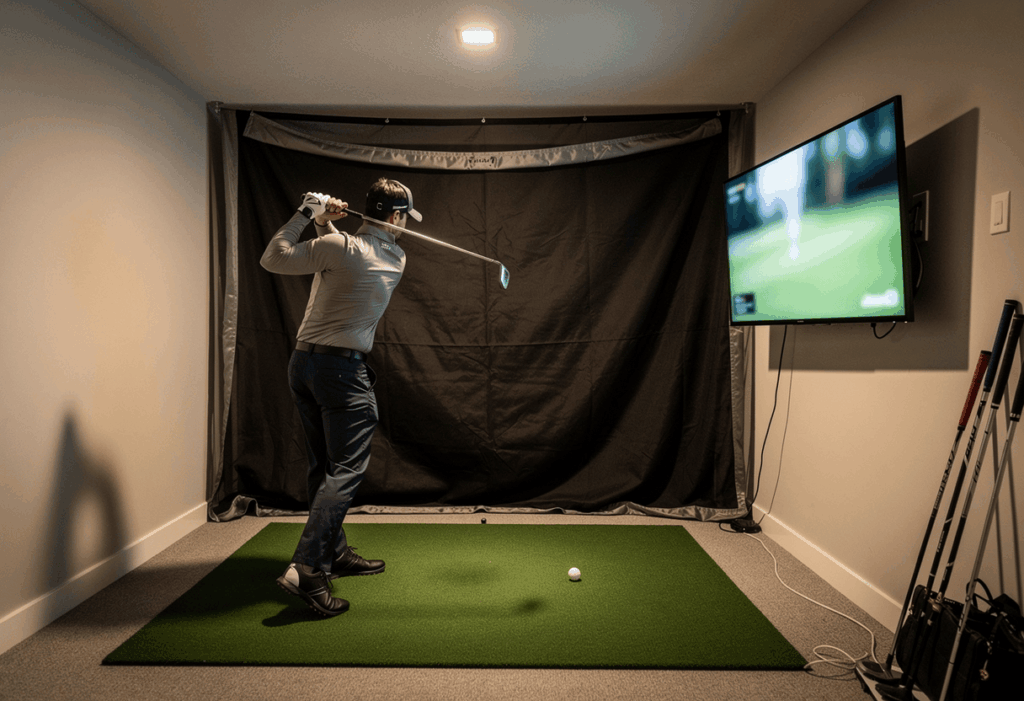
Display: In rooms where a projector won’t fit or the image would be too close to look natural, use a large TV or gaming monitor mounted behind and above the net. A 55-65 inch 4K TV ($400-$800) shows GSPro and E6 Connect beautifully at close viewing distance and eliminates the projector throw-distance problem entirely. This is the single most effective small-room adaptation.
Enclosure: The SIG8 from Shop Indoor Golf is designed for compact spaces with minimum ceiling and width constraints. A Carl’s Place DIY enclosure kit can be custom-ordered to non-standard dimensions if your room doesn’t match any off-the-shelf size. For the tightest builds, skip the enclosure entirely and use a quality impact screen with side netting – less polished, but it works.
Mat: A compact 4×5 foot hitting mat rather than a 5×7 foot studio mat saves floor space without compromising the hitting surface itself. The Country Club Elite at $200-$350 comes in compact sizes. If floor space is critical, a hitting strip (1×5 foot) embedded in landing turf saves even more room.
The TV-over-projector trick: In rooms under 15 feet deep, replacing the projector with a 55-65 inch TV mounted on the wall behind the net is the single smartest adaptation. You eliminate throw distance calculations, shadow problems, and the $700-$1,500 projector cost. The image quality on a 4K TV at close range is actually better than most projector setups.
Layout tricks that steal extra inches
Small-room builders live and die by a few layout techniques that standard guides never mention because they assume you have 18 feet of depth to play with.
Diagonal hitting. A 12×14 foot room has a diagonal of roughly 18.4 feet. Setting up the impact screen or net in a corner and hitting diagonally across the room gains you 4-5 feet of effective depth. This requires angling the enclosure and adjusting the launch monitor for the offset, but camera-based units handle 5-10 degrees of rotation cleanly.
Offset hitting position. In narrow rooms, don’t center yourself. Position the hitting mat toward one wall and use the extra space on the follow-through side of your swing. A right-handed golfer needs more clearance on their left (follow-through) side – roughly 4-5 feet from swing center to the left wall, 3-4 feet on the right. In a 10-foot room, offset positioning gives you adequate clearance that centered hitting doesn’t.
Retractable or foldable setups. If the room serves multiple purposes – home office, gym, guest bedroom – build retractable. A net that folds flat against the wall, a hitting mat that rolls up, and a launch monitor that stores in a drawer give you the room back in 5 minutes. The Murphy GolfSim concept (launching in 2026) takes this to its extreme, folding the entire simulator flat against the wall like a Murphy bed.
Reduce screen-to-tee distance carefully. The standard recommendation is 10-12 feet from tee to screen. In tight rooms, 8 feet is the absolute safety minimum – closer than that and ball rebound off the screen becomes a real danger. Never go below 8 feet, and install a screen rated for high ball speeds with proper flex absorption if you’re under 10 feet.
The best small-room build I’ve ever fitted was in a 10x13x9 spare bedroom. The owner installed a SkyTrak+ with a 55-inch TV on the wall, a basic impact net with side netting, and a compact hitting mat on foam tiles. Total cost was $3,800. He plays GSPro on it four nights a week and has dropped 4 strokes off his handicap in two seasons. The room is tiny. The results are not.
Common small-room mistakes
1. Buying a radar launch monitor for a short room
The Garmin R10, FlightScope Mevo+, and Trackman 4 all need 18-20 feet of total depth. In a 12-foot room, the data will be unreliable at best and unusable at worst. Camera-based units are the only viable technology for small rooms. This is the most common and most expensive mistake in compact builds.
2. Forcing a projector into a room that doesn’t support it
If your tee-to-screen distance is under 10 feet, the projector either shadows you on every swing or sits so close to the screen that the image quality suffers. A 55-65 inch TV produces a better experience in a tight room than a projector fighting for throw distance. Stop trying to replicate a full-bay experience in a space that doesn’t allow it.
3. Underestimating rebound distance
Golf balls hit an impact screen at 100-170 mph and bounce back toward the golfer. At the standard 10-12 feet, the rebound is manageable. At 8 feet, the ball returns faster than most golfers can react. If you’re under 10 feet from the screen, use a high-quality screen rated for low-rebound performance and always wear glasses when hitting driver.
4. Ignoring the psychological effect of tight spaces
A room that technically clears your swing but feels cramped will change your mechanics. You’ll shorten the backswing, steer the ball, and lose speed – all unconsciously. If the room makes you flinch, the data is compromised. Be honest about whether the space feels good enough to swing naturally, not just whether the tape measure says it clears.
5. Not planning the cable and equipment footprint
In a big room, the gaming PC sits in a corner, cables run along walls, and nobody notices. In a 10×12 room, every square foot is contested space. Plan where the PC, monitor/TV, launch monitor, and cables go before any equipment arrives. Wall-mounting the TV, using wireless launch monitor connections where available, and routing cables inside wall conduit all help reclaim floor space.
Frequently asked questions
What is the smallest room for a golf simulator?
The absolute minimum for any kind of swing with a screen or net is roughly 10 feet wide, 12 feet deep, and 8.5 feet high. At that size you’re restricted to irons and wedges, offset hitting, and a TV or net setup rather than a projector. A full driver sim needs at least 10W x 15D x 9H feet.
Can I put a golf simulator in a spare bedroom?
If the bedroom is at least 10 feet wide and 12 feet deep with 9-foot ceilings, you can build a functional sim. Standard 8-foot residential ceilings restrict you to irons and wedges. Use a TV instead of a projector, a compact net instead of an enclosure, and a camera-based launch monitor. The setup can be semi-portable so the room still functions as a bedroom when needed.
Do I need a projector for a small-room simulator?
No – and in many small rooms, a TV is the better choice. A 55-65 inch 4K TV mounted on the wall behind the net eliminates throw distance calculations, shadow problems, and projector cost. At close viewing distances (under 8 feet), a 4K TV actually produces a sharper image than most projector setups. Skip the projector if your room depth is under 15 feet.
What’s the best launch monitor for a small room?
The SkyTrak+ ($1,995) is the community favorite for compact builds – camera-based, minimal depth requirement, excellent GSPro compatibility. The Foresight GC3 ($7,500) requires the least depth of any high-end unit. For budget builds, the Garmin R10 ($499) works with a basic net setup on iPad, though it’s radar-based and prefers more depth.
Can I use a golf simulator in an apartment?
Conditionally. You need a room that meets the minimum dimensions and a building that tolerates the noise of ball impacts. Net-and-launch-monitor setups with foam practice balls are quieter but provide less realistic feedback. Real golf balls into an impact screen or net create a noticeable thump. Check with your building management before investing.
In summary: small works when you’re honest about the trade-offs
A small-room golf simulator is absolutely viable in 2026 – the technology has caught up to the space constraint. Camera-based launch monitors, compact enclosures, TV-over-projector setups, and diagonal hitting layouts all solve problems that would have killed a compact build five years ago. The key is matching expectations to reality.
The builders who love their small-room sims went in knowing they’d hit from an offset position, use a TV instead of a projector, and possibly restrict the bag to irons and wedges. The builders who hate theirs tried to force a full-bay experience into a space that couldn’t support it. A compact iron sim you use four nights a week does more for your game than a cramped driver setup you dread walking into.
One angle worth considering: start small and upgrade the room later. Many golfers build a net-and-monitor setup in a 10×12 spare room for $2,000, discover they’re hooked, and then invest in finishing a basement or converting a garage for the full sim experience. The small-room build isn’t a compromise – it’s a $2,000 test drive that proves whether you’ll actually use a simulator before you spend $8,000 on the real thing.
The clients who get the most value from small-room builds are the ones who reframe the question. Instead of “can I fit a full simulator in here?” they ask “what’s the best practice tool I can build in this space?” The answer is almost always a SkyTrak+ or Launch Pro, a TV, a quality mat, and GSPro – in a room most people would look at and say “that’s too small.” It’s not. It’s just different.