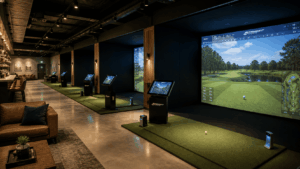
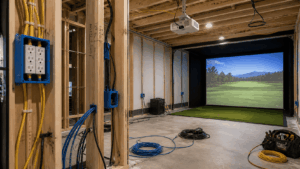
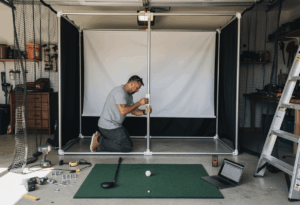
An impact screen gives you the full simulator experience – projected courses, visual ball flight, multiplayer rounds, and a room that doubles as a home theater. A net gives you ball containment and data practice at a fraction of the cost. The choice isn’t about which is “better.” It’s about whether you’re building a simulator or a practice station, and those are fundamentally different things.
I’ve built both types for clients, and the decision usually comes down to two honest questions: do you want to see your shot fly on a projected course, and does your budget support a projector alongside the screen? If yes to both, impact screen. If not – or if the room doesn’t have the depth for projection – a quality net with a launch monitor and TV is a genuinely excellent setup that produces the same data and the same improvement. Don’t let anyone tell you a net build isn’t a “real” simulator. It’s a different experience, not a lesser one.
The quick answer: Impact screen ($250-$800 for the screen alone) is required if you want projected visuals and full course simulation. Net ($200-$1,200) works for data-driven practice with a launch monitor displaying on a TV or tablet. Both stop golf balls safely. Impact screens need a projector ($700-$4,000), enclosure frame, and more room depth. Nets are simpler, cheaper, more portable, and work in tighter spaces.
What an impact screen does (and what it costs)
A golf simulator impact screen is a reinforced projection surface made from multi-layer polyester mesh designed to do five things simultaneously: stop a golf ball traveling at 100-170 mph, display a clean HD or 4K projected image, reduce dangerous ball rebound toward the golfer, absorb impact noise, and survive thousands of full-speed strikes without tearing.
The screen itself is the component that turns your setup from a practice station into an immersive golf experience. A projector displays GSPro, E6 Connect, or Trackman Virtual Golf courses onto the screen. You see your ball flight, watch it land, read the green contours, and play full 18-hole rounds with visual feedback on every shot. Without the screen, there’s nothing to project onto – you’re looking at data on a monitor or tablet.
Screen pricing ranges widely. Budget screens from Amazon sellers run $150-$250 but sacrifice image quality and durability. Carl’s Place offers three material tiers: Standard (~$250), Preferred (~$400), and Premium (~$600) with progressively better image quality and noise dampening. SIG screens bundled with enclosure packages run $800+ and are factory-tensioned for consistent flatness. The sweet spot for most home builds is a $300-$500 screen from Carl’s Place or a comparable brand.
But the screen is just one line item. A full impact screen setup requires an enclosure frame ($400-$2,000), projector ($700-$4,000), and side baffles or curtains ($100-$300) to contain mishits. Total cost for the visual portion of the build: $1,500-$5,000 on top of whatever you spend on the launch monitor, mat, and PC. That’s the real budget question most guides don’t address honestly.
What a net does (and what it costs)
A golf net is a ball containment system designed to safely stop golf balls without requiring projection, an enclosure frame, or the associated depth. The best practice nets use multiple layers of nylon or polyester netting that absorb ball energy progressively, reducing rebound to a gentle roll-back to your feet. They don’t display anything – they contain the ball while your launch monitor captures data separately.
Quality practice nets range from $200 for basic pop-up models to $800-$1,200 for premium freestanding systems like the Net Return Pro Series. The Net Return is the community gold standard: rated for 225+ mph ball speeds, folds flat in 30 seconds, and rolls the ball back to your feet after every shot. It works in rooms as narrow as 8 feet and as shallow as 10 feet – dimensions where a full enclosure and projector would never fit.
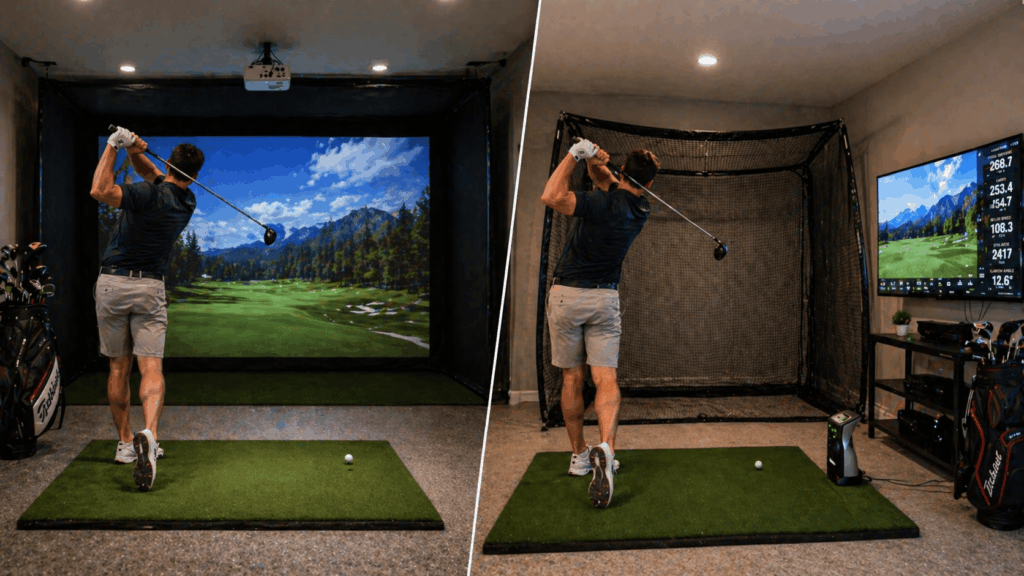
The data experience with a net is identical to a screen. Your launch monitor captures ball speed, spin, carry distance, launch angle, and club data the same way regardless of what stops the ball. The difference is visual: net users watch their ball flight on a TV, monitor, or tablet rather than on a projected surface. GSPro runs on a TV the same way it runs on a projector – same courses, same data, same software. You just see it on a 55-inch screen at the side rather than a 130-inch projection in front of you.
Net setups also win on portability and dual-use rooms. A Net Return Pro Series folds flat and stores in a closet. A floor mat rolls up. The launch monitor goes in a drawer. Setup takes 5 minutes. Breakdown takes 5 minutes. The room goes back to being a bedroom, office, or living space immediately. No permanent enclosure, no ceiling-mounted projector, no holes in the joists.
The real differences that matter
Immersion: screen wins by a mile
There’s no contest here. Hitting a shot and watching the ball arc across Pebble Beach on a 130-inch projected screen is a fundamentally different experience than watching the same shot traced on a 55-inch TV. The projected visual creates a sense of actually playing the hole – you line up to a fairway, pick your target, and see the ball fly toward it. On a TV, you’re watching data with a graphical overlay.
This immersion difference is what keeps families engaged, what makes multiplayer rounds fun, and what turns the sim room into a social space. If entertainment value matters to you – game nights with friends, kids wanting to play, the room doubling as a home theater – the impact screen is the only path that delivers.
Data and practice quality: identical
The launch monitor doesn’t care what stops the ball. A Bushnell Launch Pro capturing data at impact produces identical numbers whether the ball hits an impact screen 10 feet away or a net 8 feet away. Ball speed, spin rate, launch angle, carry distance – all measured the same way. If your primary goal is improving your swing through data-driven practice, both setups deliver the same training value.
The one caveat: some radar-based launch monitors (Garmin R10, FlightScope Mevo+) need to track the ball in flight and can produce slightly different data depending on whether the ball decelerates into a net versus bouncing off a screen. Camera-based units measure at impact and are completely unaffected by what the ball hits after.
Space requirements: nets win
A full impact screen setup needs minimum 10 feet of width, 15 feet of depth, and 9 feet of height to accommodate the screen, enclosure, projector throw distance, and hitting zone. A net setup works in 8 feet of width, 10-12 feet of depth, and 8 feet of height. That difference opens up spare bedrooms, small garages, and rooms that would never support a full projection build.
The depth requirement is the biggest differentiator. An impact screen needs 12-16 inches of clearance behind the screen for flex absorption, then 8-10 feet to the tee, then 4-7 feet behind the golfer, plus projector throw distance. A net needs the net depth (2-3 feet) plus 6-8 feet to the tee plus backswing clearance. Nets save 3-5 feet of room depth compared to a full enclosure setup.
Noise: screen is louder
A golf ball hitting an impact screen at 150 mph produces a sharp, flat thump that carries through walls and ceilings. Premium multi-layer screens dampen this somewhat, but the surface is inherently louder than netting because it’s a flat, tensioned surface. In basements, the sound transfers directly through floor joists to the rooms above.
A quality practice net absorbs ball energy progressively through multiple layers of loose netting, which is inherently quieter than a tensioned flat surface. The Net Return Pro Series is notably quieter than most impact screens on the market. For apartments, shared walls, or builds directly below bedrooms, the noise difference between screen and net is meaningful.
Durability and replacement: comparable
Quality impact screens last 2-5 years depending on usage frequency and ball speed. The strike zone wears first – you’ll see pilling, slight thinning, and eventually a change in image quality in the center of the screen where most shots land. Replacement screens cost $250-$600 depending on material tier. Some builders extend screen life by rotating the screen 180 degrees after a year to distribute wear.
Quality nets last 3-7 years with normal use. The Net Return Pro Series is rated for hundreds of thousands of impacts. Netting doesn’t develop projection-quality issues because nobody projects onto it. When netting does wear, it’s typically at the center contact zone, and replacement netting runs $100-$300.
The clients who are happiest with net setups are the ones who bought a quality TV and mounted it on the wall behind the net. A 55-inch 4K TV showing GSPro at close range actually delivers sharper, brighter visuals than most budget projector setups. The experience isn’t immersive in the same way a projected screen is, but the image quality is often better. A $400 TV frequently outperforms a $700 projector on visual clarity alone.
When to choose an impact screen
Choose an impact screen if: you want the full projected visual experience with courses displayed in front of you, your room has at least 15 feet of depth and 9 feet of ceiling height, your budget supports a projector ($700-$4,000) on top of the screen and enclosure, you plan to use the room for multiplayer rounds and social entertainment, and you want the room to double as a home theater.
The impact screen is the centerpiece of a permanent, dedicated simulator room. It transforms the space from functional to immersive. If you’re building a finished basement sim, a permanent garage conversion, or a dedicated outbuilding, the screen-and-projector setup is what makes the investment feel like a golf room rather than a hitting cage.
When to choose a net
Choose a net if: your primary goal is data-driven swing practice and you don’t need projected visuals, your room is too small for a full enclosure (under 12 feet deep or under 9 feet of ceiling), your budget is tight and the $1,500-$5,000 for screen/enclosure/projector isn’t available, you need a portable setup that can be stored between sessions, or you want to test whether you’ll actually use a simulator before committing to a permanent build.
The net is the smartest starting point for most first-time buyers. A Net Return Pro Series ($800-$1,200) plus a SkyTrak+ ($1,995) plus a 55-inch TV ($400) plus a quality mat ($300-$500) gives you a functional, data-driven practice station for $3,500-$4,100. You can play GSPro courses, track every metric, and decide over 6 months whether the full projection experience is worth the additional $3,000-$5,000 investment.
The hybrid approach: start with a net, upgrade to a screen
This is the path I recommend to most first-time clients, and it’s the one that produces the fewest regrets. Build a net setup first. Use it for 3-6 months. Decide whether you want immersion or just data.
If you discover you’re playing GSPro rounds 4 nights a week and wishing you could see the ball fly on a big screen, you’ve validated the investment in a full projection build. Sell the net, buy an enclosure and projector, and upgrade with confidence.
If you discover you mostly use the sim for 20-minute iron practice sessions and rarely play full rounds, you just saved yourself $3,000-$5,000 on a projection setup you would have underused. The net keeps working perfectly for your actual use case.
The key to making this work: buy components that transfer between setups. The launch monitor, hitting mat, gaming PC, and software all carry over from net to screen. Only the net itself gets replaced by the enclosure, and a used Net Return Pro Series sells for 60-70% of new on the resale market.
Frequently asked questions
Do I need an impact screen for a golf simulator?
Only if you want projected visuals. If you’re happy watching ball flight data on a TV or tablet while hitting into a net, a screen is optional. The launch monitor captures identical data regardless of whether the ball hits a screen or a net. The screen is for the visual experience, not the data.
Can I use a net with GSPro?
Yes. GSPro runs on a Windows PC connected to a TV or monitor – it doesn’t require a projector or impact screen. You hit into the net, the launch monitor sends data to GSPro, and the course visuals display on whatever screen you’re using. Full course play, full data, just on a smaller display.
How long does a golf simulator impact screen last?
Quality screens last 2-5 years depending on usage frequency, ball speed, and material tier. Premium multi-layer screens from Carl’s Place and SIG last longer than budget single-layer Amazon screens. The strike zone wears first. Replacement screens cost $250-$600.
Is a net quieter than an impact screen?
Generally yes. Nets absorb energy progressively through loose layers, which is inherently quieter than a tensioned flat screen surface. The difference is meaningful in attached garages and basements where impact noise carries to adjacent rooms. Premium multi-layer screens close the gap but don’t eliminate it.
What’s the best golf net for a simulator?
The Net Return Pro Series ($800-$1,200) is the community gold standard: rated for 225+ mph, auto-returns the ball to your feet, folds flat in 30 seconds, and lasts 3-7 years. For budget builds, the Spornia SPG-7 ($300-$500) is a popular alternative with good ball containment and a smaller footprint.
Can I hang an impact screen in front of a net?
Yes – this is a common hybrid approach. Hang the impact screen from the net’s frame using bungees, and the net catches anything that misses or passes through the screen. The Net Return even sells a compatible impact screen designed for this exact setup. It adds projection capability to a net build without requiring a separate enclosure frame.
In summary: the question is immersion vs. simplicity
The impact screen vs net decision isn’t about quality or accuracy. Both setups produce identical data from the same launch monitor. The decision is about whether you’re building for immersive visual simulation or efficient data-driven practice. Screens deliver the full golf-course-in-your-home experience at $1,500-$5,000 additional cost for the visual components. Nets deliver the same training value in a simpler, cheaper, more portable package.
Most guides push the impact screen because it’s the more expensive option and the more impressive-looking one. I’d push the opposite: start with a net unless you’re certain the projection experience matters to you. The net validates whether you’ll actually use a simulator before you commit the budget and room space to a permanent build. The 60-70% resale value on quality nets means the “test drive” costs you $200-$400 of depreciation over six months – cheap insurance against a $5,000 projection setup that gathers dust.
One final angle: white vs gray screen matters if you go the impact screen route. White screens produce the brightest image in fully dark rooms. Gray screens absorb roughly 40% more ambient light, producing better contrast and deeper blacks in rooms with any overhead lighting or window leakage. For garages and rooms that aren’t fully blacked out, gray is the practical recommendation despite the slight brightness trade-off.
The build I recommend most often to first-time buyers isn’t a $10,000 full-enclosure projector setup. It’s a Net Return Pro Series, a Bushnell Launch Pro, a quality mat, and a 55-inch TV on the wall. Total cost: roughly $4,500. Eight out of ten clients who start there end up upgrading to a full projection build within 18 months – but they upgrade knowing exactly what they want because they used the net setup daily for a year first. The two out of ten who don’t upgrade are just as happy, because the net gives them everything they actually use.