Most launch monitor buying guides list 15 products and tell you each one is great. That’s not helpful. The right launch monitor for your build depends on five specific questions – and once you answer them honestly, the list of viable options shrinks from dozens to 2-3 units that genuinely fit your situation.
I’ve fitted launch monitors for clients at every budget from $499 to $20,000+. The buyers who are happiest with their purchase answered these five questions before opening any product pages. The ones who regret their purchase bought the launch monitor first and discovered the constraints second. The questions are: where will you use it, how much room do you have, what software do you want, what’s your total budget including subscriptions, and do you need club data? Answer those and the decision makes itself.
The quick decision tree: Indoor only + under 16 ft depth = camera-based (Launch Pro, SkyTrak+, GC3). Indoor only + 9’4″+ ceiling = overhead option available (EYE XO2, Trackman iO). Indoor + outdoor = camera with outdoor mode (GC3, SkyTrak+) or hybrid (Mevo Gen 2). Budget under $500 = Garmin R10. Budget $1,500-$3,000 = Launch Pro or SkyTrak+. Budget $5,000+ = GC3, EYE XO2, or Trackman iO. Always verify GSPro compatibility before purchasing.
Question 1: Where will you use it?
This is the question that eliminates half the market immediately. Indoor-only, outdoor-only, and indoor-plus-outdoor buyers need fundamentally different technology.
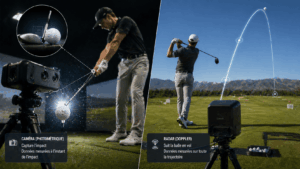
Indoor only (home simulator): Camera-based (photometric) launch monitors are the clear winner. They measure data at the moment of impact and don’t need ball flight distance, which means a ball hitting a screen 10 feet away produces the same data quality as a 250-yard outdoor shot. The Bushnell Launch Pro, SkyTrak+, Foresight GC3, and Uneekor EYE MINI all work excellently indoors in rooms as shallow as 12-16 feet. Radar units struggle indoors because they’re extrapolating full ball flight from a fraction of a second of data.
Outdoor only (range or course): Radar-based monitors track the full ball flight arc and produce the most complete trajectory data outdoors. The Trackman 4 is the gold standard. The Garmin R10 at $499 is the budget radar pick. The FlightScope Mevo Gen 2 at $1,199 is the mid-tier radar option. Camera-based units also work outdoors but they calculate trajectory from impact data rather than tracking the actual flight.
Both indoor and outdoor: The sweet spot for dual-use is a camera-based unit with outdoor capability. The Foresight GC3 ($7,500) works excellently in both environments. The SkyTrak+ ($1,995) handles both with slightly less outdoor accuracy. The FlightScope Mevo Gen 2 ($1,199) uses hybrid radar+camera technology that works acceptably in both environments. Avoid buying a pure radar unit for dual-use if your primary use is indoors – the indoor compromise isn’t worth the outdoor advantage.
Question 2: How much room do you have?
Room dimensions directly determine which launch monitors are physically viable. Get this wrong and you’ll buy hardware that doesn’t function in your space.
Ceiling height under 9 feet: Floor-mounted camera units only. No overhead-mounted options. The SkyTrak+, Bushnell Launch Pro, Foresight GC3, and Uneekor EYE MINI all sit on the floor or on a low stand beside the ball. They have no ceiling requirements beyond your own swing clearance.
Ceiling height 9’4″ and above: Overhead-mounted options open up. The Trackman iO ($13,995) requires exactly 9’4″ minimum. The Uneekor EYE XO2 ($9,000-$10,000) mounts at 9-10 feet. The ProTee VX is another overhead option. Overhead units eliminate left/right-hand recalibration and keep the floor clear, which is why mixed-handed households and families prefer them.
Room depth under 16 feet: Camera-based units only. The Bushnell Launch Pro works in 15-16 feet of total depth. The SkyTrak+ works in 15 feet. The Foresight GC3 works in as little as 13-14 feet because it sits in front of the ball rather than behind it. No radar unit functions properly under 18 feet of depth.
Room depth 18+ feet: Any technology works. Radar units like the Garmin R10 and Mevo Gen 2 need this depth to track the Doppler signal. If you have 20+ feet, you have full flexibility to choose based on budget and data needs rather than room constraints.
Carl’s Place room checklist: Ceiling under 9 ft = no overhead units. Depth under 19 ft = no radar units. Narrow width = offset tee position, beside-ball unit. Lefty + righty = center radar or overhead mount. Indoor + range use = portable unit.
Question 3: What software do you want to run?
This is the question most buyers answer last and should answer first. Your launch monitor choice determines which software platforms are available to you, and software drives the day-to-day experience far more than the hardware specs.
If you want GSPro (the community favorite at $250/year, 2,000+ courses, Sim Golf Tour): verify the launch monitor supports it. GSPro works natively with Uneekor, ProTee VX, FlightScope Mevo Gen 2, and SkyTrak+. It works through third-party bridges with Bushnell Launch Pro, Foresight GC3, and Garmin R10. Trackman does not support GSPro at all – this is the single most common dealbreaker in the community.
If you want E6 Connect ($300-$600/year, licensed courses, iPad support): it works with SkyTrak, FlightScope, Uneekor, Garmin R10, and TruGolf systems. Foresight and Bushnell connect through FSX Play rather than directly.
If you own Foresight or Bushnell hardware: FSX Play is your primary platform. The FSX 2020 license ($3,000) unlocks the full Foresight ecosystem. GSPro and Awesome Golf are now accessible through FSX integration.
If you own Trackman: Trackman Performance Studio is your only option at $1,100/year. No third-party software. The analytics and Combine protocol are excellent, but you’re locked into one platform forever.
The rule: choose the software first, then buy the compatible hardware. Not the reverse.
Question 4: What’s your real budget (including subscriptions)?
The sticker price of a launch monitor is 50-70% of your actual five-year cost. Subscriptions, software, and accessories add the rest. Here’s what each tier actually costs over five years of ownership.
Under $500: data practice only
Garmin R10 at $499 is the functional entry point. Radar-based, works outdoors well, struggles with indoor spin data. Connects to GSPro through a third-party bridge. The Garmin Golf app is free and provides basic sim functionality. Five-year total with GSPro: roughly $1,750. This tier is adequate for casual practice and basic sim play, but don’t expect reliable club fitting data.
$1,500-$3,000: the serious home builder tier
This is where most home simulator buyers should land. The Bushnell Launch Pro at $2,499 is the community consensus pick: camera-based, GSPro-compatible, no hardware subscription, accurate enough for club gapping. The SkyTrak+ at $1,995 (post-price-drop) offers excellent accuracy and the best Mac compatibility, but the SkyTrak Elite subscription at $599/year adds significant ongoing cost.
The Bushnell Launch Pro Circle B (LPi) at $1,499 is the indoor-only version – same accuracy, no built-in screen, no battery, lower price. If you’re building a dedicated indoor sim and don’t need portability, it’s the best value in this tier.
Five-year total with GSPro: Launch Pro = $3,749 (no hardware sub). SkyTrak+ with Elite = $6,240 ($599/year hardware + $250/year GSPro). The Launch Pro’s clean subscription model saves $2,500 over five years compared to the “cheaper” SkyTrak+.
$3,500-$10,000: the premium home tier
The Uneekor EYE MINI at ~$3,825 is the sleeper pick – overhead-adjacent accuracy in a portable footprint, no subscription, broad software compatibility. The Foresight GC3 at $7,500 is the accuracy benchmark for home builds – the same technology platform as the GCQuad at less than half the price. The Uneekor EYE XO2 at $9,000-$10,000 is the community favorite for overhead tracking with zero hardware subscription and native GSPro support.
Five-year total with GSPro: EYE MINI = $5,075. GC3 = $8,750. EYE XO2 = $10,250-$11,250. Uneekor’s zero-subscription model makes it increasingly attractive at this tier.
$13,000+: the professional tier
The Trackman iO at $13,995 and Trackman 4 at $21,495+ anchor the top end. The Foresight GCQuad at $14,000-$18,000 and QuadMax are the camera alternatives. These are genuinely best-in-class, but most home users won’t use the capabilities that justify the premium over a GC3 or EYE XO2.
The single biggest pricing mistake I see: clients who compare the SkyTrak+ at $1,995 to the Bushnell Launch Pro at $2,499 and choose the SkyTrak+ because it’s “$500 cheaper.” Over five years with identical software, the SkyTrak+ costs $6,240 and the Launch Pro costs $3,749. The “cheaper” launch monitor costs $2,500 more because of subscription stacking. Always calculate total cost of ownership, not sticker price.
Question 5: Do you need club data?
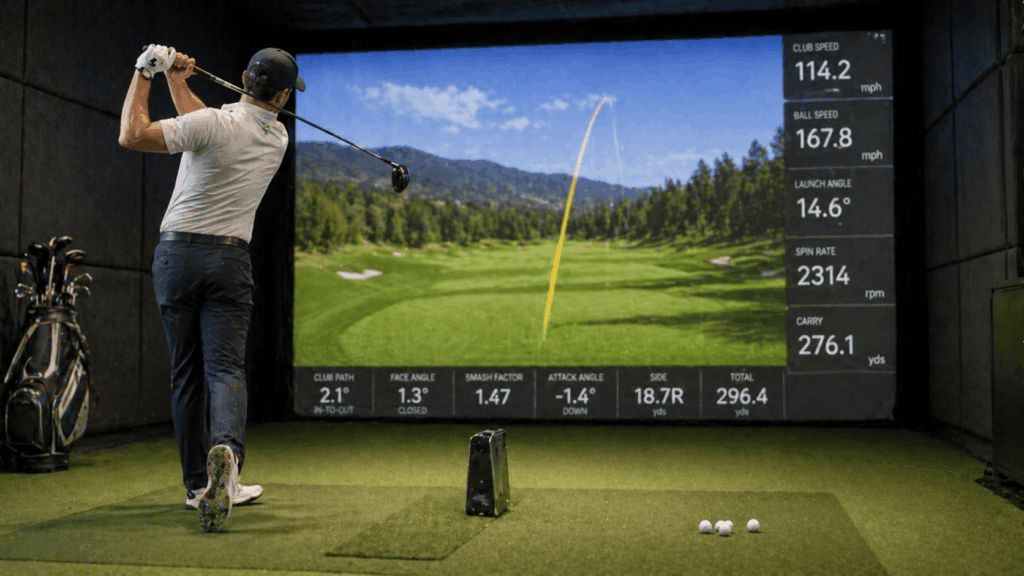
Every launch monitor measures ball data: ball speed, launch angle, spin rate, carry distance. Not every launch monitor measures club data: club speed, face angle, club path, attack angle, dynamic loft. The distinction matters for how you’ll use the information.
If you’re practicing and playing sim rounds: Ball data alone is sufficient. You see where the ball goes, how far it carries, and what the spin does. That’s enough for game improvement, club gapping, and enjoyable course play. The SkyTrak+ and Garmin R10 provide ball data only (no club data) and are perfectly adequate for this use.
If you’re diagnosing swing faults or fitting clubs: Club data matters. Knowing your face was 2 degrees open with a 4-degree inside-out path tells you exactly why the ball pushed right. Without club data, you see the result but have to guess the cause. The Bushnell Launch Pro with metallic stickers, Foresight GC3, Uneekor EYE XO2, and Trackman all provide full club data.
If you’re a coach or fitter: Club data is non-negotiable. Your clients expect it, and your recommendations depend on it. The Foresight GCQuad and Trackman 4 are the industry standards for professional fitting environments.
Note: some units require reflective stickers on the clubface to capture club data (Foresight GC3, Bushnell Launch Pro). Uneekor’s overhead systems and the ProTee VX read the club without stickers, which is a genuine convenience advantage for units in that tier.
The decision in practice: four common buyer profiles
“I want the best home sim at a reasonable price” – Bushnell Launch Pro ($2,499) + GSPro ($250/year). Camera-based, accurate, no hardware subscription, full club data with stickers. Five-year cost: $3,749. This is the recommendation for 8 out of 10 home builders.
“I want overhead tracking for my family” – Uneekor EYE XO2 ($9,000-$10,000) + GSPro ($250/year). Ceiling-mounted, no recalibration for left/right switching, no stickers, zero hardware subscription. Five-year cost: $10,250-$11,250. The premium choice for mixed-handed households.
“I want portable range + indoor practice” – FlightScope Mevo Gen 2 ($1,199) + GSPro ($250/year). Hybrid radar+camera, works indoors and outdoors, compact and portable. Five-year cost: $2,449. The best dual-use option at this price.
“I want the cheapest functional sim” – Garmin R10 ($499) + basic net + TV + GSPro ($250/year). Radar-based, limited indoor spin data, but functional. Five-year cost: $1,749. The entry point that proves whether you’ll use a simulator before investing more.
Common buying mistakes to avoid
1. Buying the launch monitor before checking software compatibility
Trackman doesn’t run GSPro. Rapsodo MLM2PRO doesn’t run any major sim platform. The Garmin R10 only connects to GSPro through a third-party bridge. Verify software compatibility before purchasing the launch monitor. This is the most common and most expensive mistake in the hobby.
2. Comparing sticker prices instead of five-year costs
A $1,995 SkyTrak+ with $599/year Elite subscription costs $6,240 over five years. A $2,499 Bushnell Launch Pro with no subscription costs $3,749 with GSPro. The “cheaper” unit costs $2,500 more over the ownership period. Always calculate total cost of ownership.
3. Buying a radar unit for a shallow room
The Garmin R10 and FlightScope Mevo Gen 2 need 18-20+ feet of total room depth. If your room is 14 feet deep, the radar data will be unreliable. Camera-based units work in 12-16 feet. Match the technology to the room, not the budget.
4. Overspending on the launch monitor and underspending on everything else
A $7,500 Foresight GC3 paired with a $150 mat, a $500 projector, and no acoustic treatment is a bad build that wastes the launch monitor’s capability. Balance your budget across all components. A $2,499 Launch Pro with a $949 Fiberbuilt mat, a $1,500 BenQ projector, and proper room finishes produces a better overall experience.
5. Not testing before buying
Visit an indoor golf lounge, a PGA Superstore, or a Golf Galaxy with launch monitor demo bays. Hit 20 shots on the unit you’re considering and see whether the data feels right, the setup works in the demo space, and the software experience matches your expectations. An hour of hands-on testing prevents months of buyer’s regret.
Frequently asked questions
What is the best golf launch monitor for a home simulator?
The Bushnell Launch Pro at $2,499 is the community consensus pick for most home builds: camera-based, GSPro-compatible, no hardware subscription, accurate club and ball data. The Foresight GC3 ($7,500) is the accuracy step-up. The Uneekor EYE XO2 ($9,000-$10,000) is the premium overhead pick.
Do I need a camera or radar launch monitor?
Camera-based for indoor use, radar for outdoor use. Camera systems measure spin directly at impact and work in tight rooms. Radar systems track full ball flight outdoors but extrapolate data indoors. For a home simulator, camera-based is the right choice at every price point except the Trackman iO hybrid tier.
What’s the cheapest launch monitor that works with GSPro?
The Garmin R10 at $499 connects to GSPro through a third-party bridge. The FlightScope Mevo Gen 2 at $1,199 connects natively. The Bushnell Launch Pro at $2,499 is the cheapest camera-based unit with reliable GSPro compatibility. If budget is tight, start with the R10 and upgrade when ready.
Is the Bushnell Launch Pro the same as the Foresight GC3?
They share the same core camera technology platform. The GC3 offers more data points, a larger clubface reading area, and the full Foresight software ecosystem. The Launch Pro is a streamlined version at roughly one-third the price. For most home builders, the Launch Pro delivers 90% of the GC3’s value at 33% of the cost.
Should I buy an overhead or floor-mounted launch monitor?
Overhead if you have 9’4″+ ceilings and want clean floor space, mixed-handed play without recalibration, and a permanently installed system. Floor-mounted if your ceilings are under 9 feet, you want portability, or your budget doesn’t reach the overhead tier ($3,825+ for EYE MINI, $9,000+ for EYE XO2).
In summary: answer the five questions, then buy
Choosing a golf launch monitor isn’t about finding the “best” unit. It’s about finding the right unit for your room, your software, your budget, and your use case. A $2,499 Bushnell Launch Pro in a 15-foot basement with GSPro is a better purchase than a $14,000 Trackman iO in the same basement if you wanted GSPro access – because the Trackman doesn’t support it.
Run through the five questions before you touch a product page. Where will you use it? How much room do you have? What software do you want? What’s your total five-year budget? Do you need club data? The answers eliminate 80% of the options and leave you with 2-3 genuine contenders. Pick the one that fits your budget from those finalists and you’ll make a purchase you’re happy with for years.
One angle most buying guides skip: resale value matters. Camera-based launch monitors from Foresight, Bushnell, and Uneekor hold 60-70% of their new price after 3 years on the used market. Budget radar units depreciate faster. If there’s any chance you’ll upgrade within 3 years, buy a unit that holds its value – the real cost of ownership is purchase price minus resale price, not purchase price alone.
The launch monitor decision I’m proudest of recommending last year: a client with a 14-foot deep basement, 8’10” ceiling, and $3,000 total budget. Every buying guide would have pushed a Garmin R10 at that budget. Instead I recommended the Bushnell Launch Pro Circle B (LPi) at $1,499 for the indoor-only version, a basic net, a quality mat, and GSPro on a TV. Total: $2,800. The R10 would have given unreliable indoor data in that shallow room. The LPi gives tour-grade accuracy. He’s used it 5 nights a week for 14 months and dropped from a 16 to an 11 handicap. The right launch monitor isn’t the most expensive one. It’s the one that fits the room.